How to connect multiple TVs in a pub: splitter, switch or matrix?
One box, five tellys? Splitters, switches and matrices in plain words, how far HDMI really goes, Cat6 extenders to 100m, the echo problem, and what we use at Teal Farm.
Match day. One box, five tellys, and the one over the pool table is still showing the menu screen because nobody knows which lead goes where.
Getting the same picture on every TV in a pub sounds simple. Then you're in the shop staring at "splitters", "switches", "matrices", "extenders" and "HDBaseT", and the lad behind the counter is no help either.
So here's the whole thing in plain words: what each box does, how far you can run a cable, what goes wrong, and how I'd set up a pub with anything from two screens to ten. I'll also tell you what we run at Teal Farm.
The short answer
- Same picture on every TV, one source? You want a splitter (one in, many out).
- Several sources, one TV? You want a switch (many in, one out).
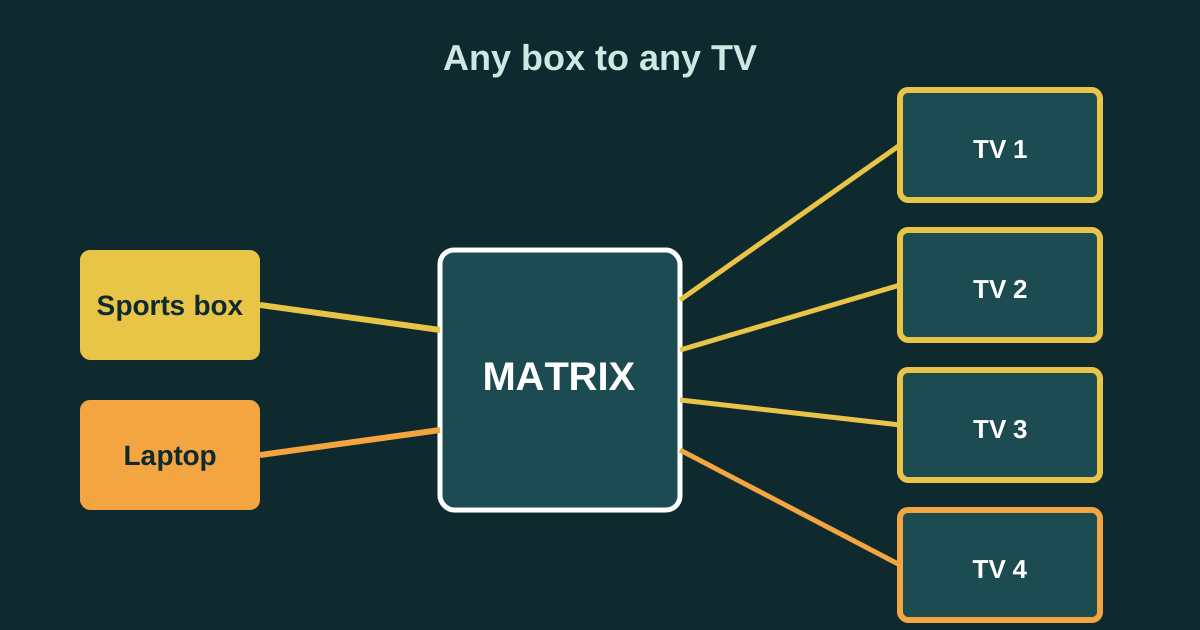
- Several sources, several TVs, and you want to choose what goes where? You want a matrix (any in to any out).
- TV more than a few metres from the box? Don't trust a long HDMI lead. Use an HDMI over Cat6 extender (HDBaseT), good for up to 70m at 4K or 100m at 1080p on a decent kit.
- Only need a web page, a quiz or your offers on every screen? You may not need any of this. A stick or a browser on each TV can show the same page.
Splitter, switch, matrix: what each one does
A splitter: one in, many out
A splitter takes one source, like a sports box or a laptop, and sends the same picture to several TVs at once. Electronics Notes describes it exactly like that, and Monoprice puts it plainly: splitters are "limited to duplicating the same signal to multiple displays."
Good for: a small pub showing one match on every telly.
Not good for: showing football on two screens and the racing on another. Every screen gets the same thing.
A switch: many in, one out
A switch does the opposite. It takes several sources and lets you pick one to send to a TV. Monoprice notes that only one source can be shown at a time.
Good for: a single big screen where you want to flip between the sports box, the quiz laptop and a streaming stick.
A matrix: any in to any out
A matrix is a splitter and a switch in one box. Any source can go to any TV, and you change it with a remote or buttons on the front. Monoprice says matrices are pricier and more complex than the other two, which matches what you'll see in the shops.
Good for: a pub with two or more sources and several TVs, where you want football on the bar screens, racing in the corner and the quiz in the lounge, all at once.
This is what we've got at Teal Farm. Our screens run through an HDMI matrix, with a spare MacBook as one of the sources. It means the TVs can show our own loop of clips, offers and the phone quiz, or flip to the match, without anyone crawling behind a telly with a torch.
How far can an HDMI lead go?
This is where most pub set-ups go wrong.
ViewSonic's support page says the HDMI spec doesn't set a maximum cable length; it depends on the maker. It estimates that a normal (passive) HDMI cable works up to about 4 to 5 metres for older HDMI 1.4 kit, and about 2 to 3 metres at HDMI 2.1 speeds.
In a pub, the box is behind the bar and the TV is across the room. That's often 10, 15 or 20 metres. A long cheap HDMI lead might work on the day you fit it and then flicker every Saturday. You'll spend more time fiddling with it than it cost.
Use Cat6 for the long runs
The fix most installers use is an HDMI over Cat6 extender, often sold as HDBaseT. You plug HDMI into a small box at one end, run a network cable to a small box at the other, and plug the TV in there.
One UK-sold kit I checked (Lindy's 100m HDBaseT extender) is rated for:
- up to 70 metres at 4K, and
- up to 100 metres at 1080p,
over a good Cat6 cable. The listing warns that wall plates, joins and patch panels cut that distance, so run one clean cable where you can.
Electronics Notes also mentions that splitters and matrices come in network-cable versions for longer runs, so you can get the splitting and the long cable in one kit.
Many of these kits also pass the remote control signal back down the cable (Lindy's has IR in both directions), so you can change the channel on the box behind the bar while stood by the TV.
The things that go wrong
"No signal" or a black screen: resolution
Electronics Notes says the source and every screen on a splitter have to agree on one resolution, normally the lowest one any of them can show. If one old TV can only do 1080p, the whole lot may drop to 1080p, or that one screen may stay black.
Their tips: plug the lowest-resolution TV into output 1 on the splitter, and if it plays up, switch the splitter off, wait, and switch it back on. If you're buying for 4K, check the box supports HDCP 2.2 (the copy protection used by 4K sources), as they advise.
The echo
Put four TVs in one room with the sound on and you'll hear it: the same commentary, a split second apart on each telly. Grooven, a US company that does audio for bars, points this out and suggests muting most of the TVs and running the sound through one set of speakers instead.
In a pub I'd go further: one TV on sound, or a proper speaker, and the rest muted with subtitles. For quizzes and offers, silent screens with big words work better anyway.
Wireless "HDMI" and casting
Wireless senders and casting look tidy, but Grooven notes they're less reliable for keeping screens in sync than wired kit, and anything streaming needs strong Wi-Fi. For one telly in a beer garden, maybe. For match day on every screen, wire it.
Someone turns a TV off or changes the input
It'll happen. Business TVs with button locks help, and so does labelling every remote. Our guide to the best TV for a pub covers locks and timers.
Set-ups for different pubs
Two or three TVs, one room
- One sports box into a 1 in, 4 out splitter.
- Short HDMI leads to the nearest screen, Cat6 extenders for anything over about 5 metres.
- One TV on sound, the rest muted.
Cheap, simple, and the staff can't get it wrong because every screen shows the same thing.
Four to eight TVs, two rooms, two or more sources
- Sports box, a second box or a laptop, and a stick into a matrix (for example 4 in, 4 out or 4 in, 8 out).
- Cat6 runs to each TV, ideally with the matrix and extenders from the same maker so they work together.
- A labelled remote behind the bar, with a little card: "Button 1 = bar TVs, Button 2 = lounge".
This is the "football in the bar, quiz in the lounge" set-up. Spend a bit on a decent matrix and good cable. You'll only fit it once.
Lots of screens, lots of different things
Grooven suggests that for six or more TVs showing different things, AV over IP (sending video over your network) becomes the better option, with each screen managed from one place. That's installer territory. Get quotes, and ask for a written test on every screen before you pay.
Do you even need a splitter?
If all you want on every screen is a web page, like your offers, the week's events or a phone quiz, you might not need any of the boxes above.
Each TV can open the same web page on its own, with a cheap streaming stick or the TV's own browser. We've got a step-by-step guide to putting a web page on a pub TV. The upside: no long cables, no splitter, and each screen can show something different if you want.
The catch: you're relying on your Wi-Fi, and someone has to turn each one on. Pick sticks or TVs that switch on by themselves, and do a 30-second check of every screen before opening.
Many pubs end up with both: the sports box through a splitter or matrix for the match, and a stick on each TV for everything else. If you're planning a big one-off night like a race night, our race night equipment guide has the laptop sleep settings and a backup plan.
What to buy
We haven't lab-tested every box on the market, so here's what to look for, with a link to see what's out there. Check each listing for the things below before you buy.
- Splitter (one source, several TVs): "1 in 4 out" (or however many TVs), says 4K and HDCP 2.2. See 4K HDMI splitters 1 in 4 out.
- Switch (several sources, one TV): enough inputs, comes with a remote. See 4K HDMI switches with remote.
- Matrix (any source to any TV): the size you need (4x4, 4x8), a remote, 4K and HDCP 2.2. Ours at Teal Farm is an HDMI matrix. See 4K HDMI matrix switches.
- HDMI over Cat6 extender (long runs): says HDBaseT, the distance you need at 4K (often 70m) and IR pass-through. See HDBaseT extender kits.
- Cat6 cable: solid copper, long enough for the run in one piece, no joins. See Cat6 solid copper cable.
- Short HDMI leads for the box-to-splitter and extender-to-TV ends. See 1 metre high speed HDMI cables.
- Cable labels, so the next person knows which lead is which. See cable labels.
Before you buy: a checklist
- Count your sources and your TVs. One source = splitter. Many sources, one TV = switch. Many and many = matrix.
- Measure every cable run, properly, along the route the cable will take, not in a straight line.
- Anything over about 5 metres: plan a Cat6 extender, not a long HDMI lead.
- 4K? Check the splitter, matrix and extenders all say 4K and HDCP 2.2.
- Sound: decide which one TV, or which speaker, gets the sound.
- Remote control: do you need to change the channel from the TV end? Get kit that passes IR.
- Labels: label every cable at both ends and every remote.
- Test day: test every screen with every source before a big match, not during it.
- Licences: showing live TV needs a TV Licence, and showing TV to customers usually needs a music licence too. Our guide to what to put on your pub TVs has the details.
Frequently asked questions
How do I get the same picture on all the TVs in my pub?
Use an HDMI splitter. It takes one source, like a sports box, and sends the same picture to several TVs at once. For TVs more than a few metres away, use an HDMI over Cat6 extender rather than a long HDMI lead.
What's the difference between an HDMI splitter and a matrix?
A splitter sends one source to several TVs, so every screen shows the same thing. A matrix lets any of several sources go to any of several TVs, so you can show football on some screens and something else on others, changed with a remote.
How long can an HDMI cable be?
The HDMI spec doesn't set a maximum; it depends on the cable. ViewSonic estimates a passive cable works up to about 4 to 5 metres for HDMI 1.4 and about 2 to 3 metres at HDMI 2.1 speeds. For longer runs, use an HDMI over Cat6 (HDBaseT) extender.
How far can HDMI over Cat6 go?
It depends on the kit. One UK-sold HDBaseT kit is rated for up to 70 metres at 4K and up to 100 metres at 1080p over good Cat6 cable. Wall plates and joins in the cable reduce the distance.
Why is one TV blank on my splitter?
Often it's a resolution clash: every screen on a splitter has to agree on one resolution. Try plugging the lowest-resolution TV into output 1 and power-cycling the splitter. For 4K, check everything supports HDCP 2.2.
How do I stop the echo from several TVs?
Put the sound on one TV, or through one set of speakers, and mute the rest. Screens a split second out of sync with the sound on make an echo.
Sources
- Electronics Notes: HDMI splitter, switch and matrix: what are the differences
- Monoprice: AV splitters, switches and matrices
- ViewSonic support: What is the maximum length of HDMI cable?
- RCB Logic: Lindy 100m Cat6 HDMI 4K60 HDBaseT extender kit
- Grooven: How sports bars, restaurants and hotels sync TVs together
- TV Licensing: Check if you need a TV Licence
We checked every source on 16 November 2026. Rules change, so check the latest version before you act. Nothing here is legal advice.