Race night equipment: what you need (using the TVs you've got)
The full race night equipment list for a pub or club, plus how to get the race on every TV, laptop settings that stop it going to sleep, sound, a test plan and a backup.
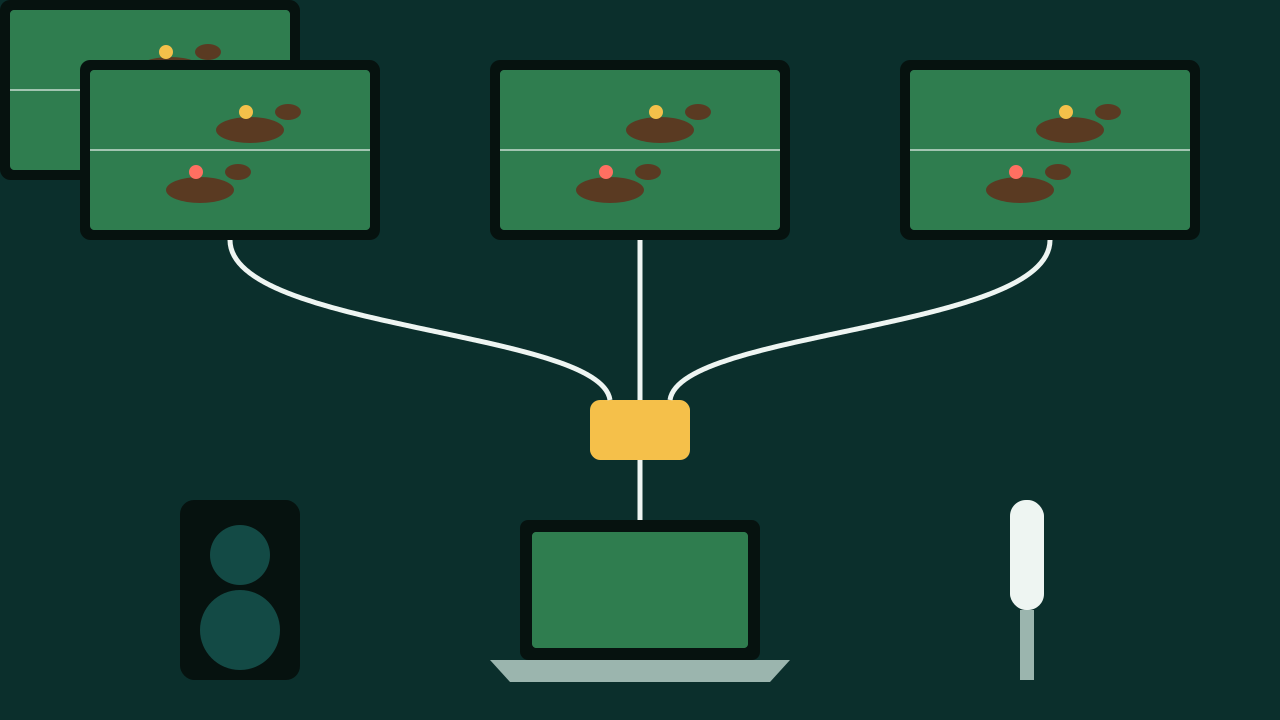
Most race night guides give you a kit list that starts with "a projector and a 100-inch screen". That's grand if you're in a village hall. In a pub, you've already got tellys on the wall. The trick is getting the race onto all of them, with sound people can hear over the cheering, without the laptop going to sleep halfway through race three.
This guide is the kit list I'd actually use in a pub or a clubhouse. It covers what you need, how to wire it, the settings to change, and how to test it so nothing goes wrong on the night.
If you're still planning the night itself, read how to run a race night in a pub first. This one is just the kit.
The short list
For a pub race night you need:
- The races. A download pack, a DVD, or a screen-based race night app.
- Something to play them on. A laptop, or a TV stick or smart TV for a web-based race night.
- A way to get the picture on your screens. An HDMI lead for one TV, or a splitter for several.
- Sound. Your PA or a decent speaker, plus a microphone for the host.
- Paper or phones. Race cards, horse tickets and a sponsorship sheet, unless people pick on their phones.
- Cash kit. Two cash tins, floats and a counting sheet.
- Power and cables. A surge-protected extension block, spare leads and gaffer tape.
The rest of this guide goes through each one.
1. The races
You've got three options.
A download pack
Most race night sellers now sell downloads rather than DVDs. One seller, racenight.me.uk, lists packs from £4.99 to £49.99 for a single set, with bundles and yearly options costing more. It says its packs run on "any Windows PC or Mac" without an internet connection.
A night is usually six to eight races. racenight.me.uk describes them as pre-recorded races of about two minutes each.
A DVD
Still around, and fine if you've got a DVD player plugged into the pub TV already. PTA UK mentions a DIY race night kit for £17.99. Check the disc plays before the night, because old players can be fussy.
A screen-based race night
Newer race nights run in a web page on the TV itself. The race plays on every screen that has the page open, and people pick a horse on their phone. No laptop, no splitter, no paper. If you already have a way to show a web page on your TVs, this is the easiest setup. Our guide on how to put a web page on a pub TV explains how.
Can you show it in public?
GOV.UK says you usually need permission from the copyright owner to show films or TV shows in public, and that a TV Licence doesn't give you that. Race night packs are made to be shown at events, but read the pack's terms to check it covers showing it in your pub.
2. The laptop
Almost any laptop that can play a video will do. What matters more is setting it up so it behaves on the night.
Stop it going to sleep
Nothing kills a race night faster than the screen going black mid-race. Change these before the night:
- Windows 11: Start, Settings, System, Power & battery, then "Screen, sleep, & hibernate timeouts". Set "Turn my screen off after" and "Make my device sleep after" to the longest option for when it's plugged in. That's from Microsoft's own help page.
- Mac: Apple menu, System Settings, Lock Screen. Change "Turn display off on power adapter when inactive" to the longest setting. That's from Apple's Mac User Guide.
Other settings to change
- Plug it in. Run it on mains power, not the battery.
- Turn off notifications. You don't want a message from your mam popping up on every telly in the pub.
- Close everything else. Email, chat, browser tabs. Only the race night should be open.
- Download the races to the laptop. Don't stream them over the pub Wi-Fi if you can avoid it.
- Turn off automatic updates for the night. A laptop that restarts to update during the interval is a classic.
- Turn the laptop's volume to full and control the volume on your PA instead.
3. Getting the race on your screens
One TV or a projector
An HDMI lead from the laptop to the TV, and switch the TV to that HDMI input. Make sure the lead is long enough to reach where the host stands, so they can press play without running across the room.
Several TVs (the bit other guides skip)
Most pubs have more than one telly, and a race night on one screen means half the room is watching the back of someone's head. You've got three ways round it:
- An HDMI splitter. A small box with one HDMI in and several out. The laptop goes in, and each TV gets a lead from the splitter. Simple, but you need a lead to every TV, and long cable runs across a pub are fiddly.
- Your existing TV system. If your pub already sends one picture to every TV (some pubs have this for sport), plug the laptop into that instead of the usual box. Ask whoever installed it which input to use.
- A web-based race night. Each TV opens the same page, so there are no cables between them at all.
Whichever you pick, walk round the whole pub with the race playing and check every screen, including the one in the corner nobody watches.
4. Sound
This is the one people forget. TV speakers are fine for a quiet room and useless once 60 people start shouting at a horse.
- Use the pub's PA or a proper speaker, wired to the laptop's headphone socket or through the TV.
- Get a microphone for the host. The racenight.me.uk checklist recommends at least two microphones, one for the host and a spare.
- Fresh batteries in any wireless mic, plus spares behind the bar.
- Test it from the back of the room. If you can't hear the host by the toilets, turn it up.
If the back of your room always struggles to hear, our post on why the back of the room can't hear your quiz has fixes that work just as well for a race night.
Playing music between races? Make sure your music licence covers it. Our music licence guide explains what the PPL PRS licence covers.
5. Paper or phones
With a traditional race night you need:
- Race cards with the races, times and horse names, one per table.
- Horse tickets or an owners' sheet, so you know who owns which horse.
- A sponsorship sheet for the businesses who've bought a race.
- A whiteboard or flip chart by the bar for winners.
Our free race card and sponsorship sheet maker prints race cards and a sponsorship sheet on A4, with no sign-up.
If everyone picks on their phone, you can skip the paper. You just need a QR code on the screen and decent Wi-Fi or mobile signal.
6. Cash kit
For a fundraising night with money involved:
- Two cash tins, each with a counted float written down.
- A sheet to record each stream of money: horses, sponsors, raffle.
- A card reader if you take card payments for horses.
- Two people to count together at the end.
On a free race night with no money, you don't need any of this. If money is involved, read whether pub race nights are legal before you plan what to charge.
7. Power and cables
- A surge-protected extension block.
- Spare HDMI lead, power lead and audio lead. racenight.me.uk suggests carrying spares of each.
- Gaffer tape to stick down any lead that crosses a walkway. A customer tripping over the HDMI lead takes the race and them out at once.
- A phone charger for the host, if the race night runs from a phone or tablet.
Test it properly
racenight.me.uk says to test all the kit together at least 48 hours before the event, with the actual race files. I agree, and I'd add a few checks.
Two days before:
- Play a full race on the actual TVs, with the actual sound, in the actual room.
- Check every TV shows the picture.
- Leave the laptop on for an hour without touching it. If the screen goes off, the sleep settings haven't stuck.
On the day, an hour before doors:
- Switch everything on and play the first race with the sound down.
- Check the mic from the back of the room.
- Tape down the leads.
- Put the race cards on the tables.
Have a backup plan
Things go wrong. Plan for it:
- A second device with the races on it. A spare laptop or even the files on a USB stick.
- A spare HDMI lead behind the bar.
- A "back in two minutes" plan. If the tech falls over, the host announces a short break, the bar gets busy, and nobody minds.
What it costs
Rough costs for a pub that already has TVs and a PA:
- Races: from free for a free screen-based race night, to about £5 to £50 for a download pack, using the prices above.
- A splitter and leads: only if you need to reach several TVs and don't already have a system that does it.
- Printing: a few pounds for race cards and tickets.
Most of what you need is already in the pub. The money goes on the races and maybe a splitter.
The easy way
This is the reason we built a race night into StockTap TV. It runs in a web page on every TV in the pub, so there's no laptop to keep awake and no splitter to wire. Everyone picks a horse on their phone, the race plays on every screen, and it's free to play with no money involved. You start it from your dashboard or set it for the same time every week.
Want ideas for the night itself? See our race night ideas.
Frequently asked questions
What equipment do you need for a race night?
The races (a download pack, DVD or app), a laptop or other device to play them, an HDMI lead or splitter to reach your screens, a PA or speaker with a microphone, race cards or phones for picking horses, and cash tins if money is involved.
Can I run a race night on more than one TV?
Yes. Use an HDMI splitter from the laptop to each TV, plug into a system that already sends one picture to all your screens, or use a web-based race night that every TV can open on its own.
Do race night packs need the internet?
Many don't. racenight.me.uk says its download packs run on a Windows PC or Mac with no internet connection. Download the races before the night either way.
How do I stop my laptop going to sleep during a race night?
On Windows 11, go to Settings, System, Power & battery and set the screen and sleep timeouts to the longest option. On a Mac, go to System Settings, Lock Screen and change "Turn display off on power adapter when inactive". Keep it plugged in.
Do I need a projector for a race night?
Not in a pub with TVs. A projector helps in a big hall, but in a pub it's better to put the race on every TV you already have so everyone can see it from their seat.
Do I need a licence to show race night videos?
GOV.UK says showing films or TV in public usually needs the copyright owner's permission. Check that your race night pack's terms cover showing it in a pub.
Sources
- racenight.me.uk: Race night checklist
- racenight.me.uk: How to run a race night
- PTA UK: Step by step: race night
- Microsoft Support: How to adjust power and sleep settings in Windows
- Apple Support: Change Lock Screen settings on Mac
- GOV.UK: Showing films and TV shows in public
We checked every source on 10 November 2026. Rules change, so check the latest version before you act. Nothing here is legal advice.