Best TV for a pub: business TV or a home telly? The real sums
Should a pub buy a business TV or a cheap home one? Hours a day, warranty, brightness, button locks and a worked 3-year cost, plus size, placement and how many.
Every landlord has done it. The telly over the fireplace packs in on a Friday, so you nip to the big shop on Saturday morning, grab whatever 55 inch is on offer, and have it on the wall by opening time.
It works. Until it doesn't. And then you find out the warranty you thought you had doesn't cover a pub.
So is a proper "business TV" worth paying more for, or is that just the shops selling you a badge? I've dug into what the makers actually say, what's in the small print and what it costs per year, so you can decide with the real numbers in front of you.
The short answer
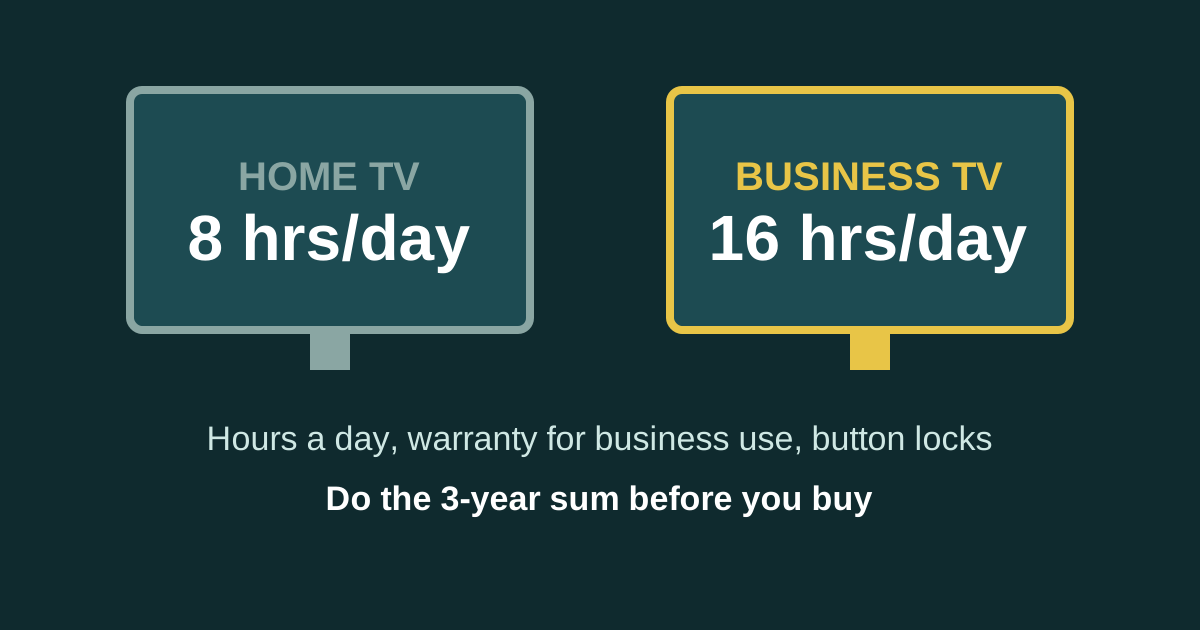
- Home TVs are built for home hours. Samsung says its consumer TVs are designed for about 8 hours a day. Its business TVs are built for 16 hours a day, 7 days a week.
- Check the warranty small print. Samsung's UK 5-year TV warranty offer says it isn't available to any company or organisation that buys for commercial use. The standard warranty on the same TVs is 12 months.
- Business TVs come with longer cover for business use. Samsung UK says its business and hotel TVs come with a 3-year manufacturer warranty.
- Business TVs lock. Panel button locks and USB locks stop customers turning the volume up or the telly off.
- For a screen that's on all day showing sport, a quiz or offers, a business TV usually wins over three years. For a telly in the function room used twice a month, a home TV is fine.
What's actually different about a business TV
Strip away the sales talk and there are five real differences.
1. Hours a day
This is the big one. When Samsung launched its business TV range in the UK, it said they're made to run up to 16 hours a day, seven days a week, compared with 8 hours for its consumer TVs. A Sharp business page makes the same point: commercial TVs are specified for up to 16 hours a day, every day, with tougher power supplies and better cooling to cope.
Now think about your busiest telly. At Teal Farm the screens are on from opening time to last orders, which is easily 12 hours on a normal day. That's well past what a home set is built for, every single day.
2. Warranty
This is where a cheap telly can turn expensive.
Samsung's UK terms for its 5-year TV warranty offer say the promotion is only for end user consumers, and not for any company or organisation that buys for commercial use. The standard warranty on those TVs is 12 months from the invoice date.
So a pub that buys a home TV and registers for the 5 years may find the extra years don't apply. Read the terms for whatever brand you buy, because each maker words it differently.
Samsung UK says its business and hotel TVs come with a 3-year manufacturer warranty. A UK seller's listing for a 55 inch Samsung business TV also showed 3 years, though its own spec table said 2, so check what you're actually getting before you pay.
3. Your rights when it breaks
When you buy as a business, the Consumer Rights Act 2015 doesn't cover you. That's for consumers. Business-to-business sales of goods fall under the Sale of Goods Act 1979.
The goods still have to be as described, fit for purpose and of satisfactory quality. But a business buyer doesn't get the automatic 30-day right to reject faulty goods for a full refund that a consumer gets. One more reason the written warranty matters more for a pub.
4. Locks and control
Customers press buttons. They just do. Samsung's business TVs have a secured PIN pairing, a panel button lock and a USB port lock, and an automatic on/off timer so the TV can switch on and off by itself every day. Samsung's hospitality pages also talk about volume limiters and locking the menus.
On a home telly, anyone who finds the buttons on the back can change the input, mute it or switch it off. If you've ever had the quiz go off mid-round because someone leaned on the side of the TV, you'll know.
5. Brightness and burn-in
Business TVs are usually made to stay readable in brighter, uncontrolled light, like a bar with big windows. They also tend to have better protection against the same image sitting on screen for hours, which matters if you show a logo, a scoreboard or an offers slide all day.
The UK listing I checked for a 55 inch business TV gave 300 to 350 cd/m² brightness (that's the same as "nits"). Compare that number when you're shopping, because many home TV listings don't give it at all.
The sums: a business TV over three years
Here's a worked example using a real UK listing. Prices change all the time, so treat this as the way to do the sum, not today's price.
- 55 inch Samsung business TV: £866.99 ex VAT on the UK seller's page I checked (£1,040.39 with VAT), rated for 16 hours a day, listed with a 3-year warranty.
- Cost per year over the warranty: £866.99 ÷ 3 = about £289 a year, or about £5.56 a week.
- Cost per hour if it's on 12 hours a day, 7 days a week: 12 × 365 = 4,380 hours a year, so £289 ÷ 4,380 = under 7p an hour.
Now do the same sum for the home TV you're looking at. Take the price, divide by one year (the standard warranty, if the extended cover won't apply to a business), and remember it's built for 8 hours a day, not 12.
If the home TV is half the price but you might replace it after a year with no cover, the business TV often comes out cheaper. If the home TV is a third of the price and it's going in a room that's only used for parties, the home TV wins. Do the sum for your pub, with your prices.
If you're VAT registered, your accountant will tell you how the VAT works on a TV for the business. I'm not going to guess that one for you.
Which TV goes where
Not every screen in the pub does the same job, so not every screen needs to be the same.
- Main bar screens, on all day: business TVs. These run the sport, the quiz and the offers. Hours and locks matter most here.
- Screens near the door or windows: brightness matters. Check the cd/m² number.
- Beer garden or smoking shelter: a normal TV, home or business, isn't made for outside. You'd need an outdoor-rated screen, which is a different (and pricier) thing altogether.
- Function room, used now and then: a home TV is usually fine.
- Back office for the CCTV or the till reports: a cheap monitor does the job.
What size, and how many?
There's no magic number, but here's how I'd think about it.
Can everyone see one? Walk round the pub and sit in every seat. If you can't see a screen from a table, that table gets left empty on match days. That matters more than the size of any one screen.
Big enough to read from the back. Sport is easy to follow on any size. A quiz question, a race card or your offers slide has words on it, so it needs to be readable from the furthest seat that can see it. Put a slide with your normal font size on the TV and read it from the back before you buy bigger.
More screens, smaller, often beats one huge one. Two 55s on different walls cover more seats than one 85 over the bar.
Think about the wiring before the wall. Every screen needs power and a picture. If you want the same thing on every TV, you'll need splitters, a matrix or something web-based on each screen. Our guide on how to connect multiple TVs in a pub explains the options, and our race night equipment guide covers splitters and laptop settings for a big night.
Where to look
Business TVs are mostly sold through AV and business suppliers rather than the big shops, so compare a couple of them on the hours, the warranty and the price ex VAT. A few things are easy to find online:
- Business TVs: search for the model sizes you need and check the listing says "business", "commercial" or "16/7". See business TVs on Amazon.
- Wall brackets: get one rated well above the TV's weight, with a lock if the screen is somewhere people can reach. See lockable TV wall brackets.
- A spare remote per TV, labelled, kept behind the bar. See universal TV remotes.
Whatever you buy, read the warranty for commercial use before you pay.
Before you buy: a checklist
- Hours: what does the maker say it's built to run per day? Get it in writing.
- Warranty: how long, and does it cover commercial use? Read the terms, not just the sticker.
- Locks: can you lock the buttons, the USB and the menus?
- On/off timer: can it switch itself on at opening and off at close?
- Brightness: what's the cd/m² figure, and is the room bright?
- Inputs: enough HDMI ports for everything you'll plug in? The business TV I checked had three.
- Tuner: if you watch broadcast TV on it, does it have a UK tuner (DVB-T2 for Freeview)? Some business screens and most signage monitors don't.
- Mounting: is the bracket rated for the weight, and is the wall up to it?
- Licences: live TV needs a TV Licence, and playing music or showing TV to customers usually needs a music licence too. Our guide to what to put on your pub TVs covers the licences.
Don't forget what goes on them
A good telly showing nothing is still showing nothing. The pubs that get the most out of their screens plan what goes on them when there's no match: offers, what's on this week, a quiz people can join on their phones. Our pub digital signage guide goes through the options and what they cost.
Frequently asked questions
Can I use a normal TV in a pub?
Yes, there's no law against it. But check the warranty terms, because some makers' extended warranties exclude commercial use. Samsung's UK 5-year offer, for example, says it isn't for companies that buy for commercial use. Home TVs are also built for fewer hours a day than business TVs.
What's the difference between a commercial TV and a normal TV?
Commercial or business TVs are built to run longer each day (Samsung says 16 hours a day, 7 days a week, against 8 for its home TVs), usually have a longer warranty for business use, and have locks and timers so customers can't fiddle with them. They often cost more up front.
Does a TV warranty cover use in a pub?
It depends on the maker and the terms. Read the warranty for commercial or business use before you buy. Samsung UK's business and hotel TVs come with a 3-year manufacturer warranty, while its 5-year offer on home TVs excludes commercial buyers.
How many hours a day can a TV run?
The maker sets that. Samsung says its consumer TVs are designed for about 8 hours a day and its business TVs for up to 16 hours a day, 7 days a week. If your pub screens are on from opening to close, that's often 12 hours or more.
What size TV does a pub need?
Big enough that words on screen can be read from the furthest seat that can see it, and enough screens that every table can see one. Two mid-size screens on different walls often cover more seats than one very big screen.
Do I need a TV Licence for every TV in the pub?
TV Licensing says a business needs a licence if anyone on the premises watches live TV or uses BBC iPlayer. One licence generally covers all the TVs on one site, but not any living accommodation, so a flat upstairs needs its own. If a screen only shows your own slides or a web page, that alone doesn't need a TV Licence.
Sources
- Samsung UK newsroom: Samsung unveils new Business TVs for SMEs
- Samsung UK: Business TVs
- Samsung UK: 5 year warranty TV promotion terms, 1 May 2026 to 30 April 2027 (PDF)
- Samsung: Consumer vs commercial TVs (PDF)
- Sharp Business: Top 5 differences between commercial and consumer TVs
- Onedirect: Samsung BE55FX-H Business TV 55 inch listing
- LegalVision UK: Consumer Rights Act vs Sale of Goods Act
- TV Licensing: Check if you need a TV Licence
- TV Licensing: Pub landlords urged to check TV Licences
We checked every source on 16 November 2026. Rules change, so check the latest version before you act. Nothing here is legal advice.